I used to make fun of Apple users for a long time – for overpaying for their computers (especially hardware upgrades) and for not being able to plug in HDMI cables, needing to make use of other people’s Windows laptops for their presentations. But Apple’s switch from Intel to their own ARM-based CPUs has changed things. Suddenly, Apple computers are not just nice to look at – they perform, too. In fact, their single-core performance currently beats Intel and AMD by a wide margin, and do it while being silent.
So, naturally, I considered getting some, but couldn’t justify the expense just for giving it a try – especially considering that my software development happened under Windows. But then, two things changed – I switched from C++ to Rust, meaning that I could leave Visual Studio (the big one, not Code) behind, and Apple released the Macbook Neo als lower-cost entry-level Macbook. After thinking about it for a while and reading/watching many reviews, I eventually bought the 512GB version in Indigo. So here’s my short-term review.

What’s great
Chassis
Apple made a wise choice by keeping its premium approach and giving the Macbook Neo an all-aluminum chassis. This feels much more rigid than the plastic laptops that are common in this price range. When closed, the Neo actually feels nicer than the Air, due to its rounded edges. The color selection should have something for everyone – Blush for girls, Indigo for boys, Citrus for extroverts, and Silver for those who want to stay under the radar.
Display
Apple has long excelled with bright high-resolution displays, and the Neo is no exception. Where many Intel/AMD offerings are still stuck at 300 nits, the Neo has a 500 nit screen. The downside is that it is glossy, so it will reflect lighting, but so far I haven’t found this to be an issue.
Noiseless
This is what really sets the Macbook Neo and Air apart from the competition. Yes, there is thermal throttling, but the performance is OK even under throttling. Compare this to other laptops, where background processes or a Teams meeting will cause the fans to run. The latter is especially annoying, as it will be picked up by the microphones and transmitted to all attendees.
What’s good
Keyboard
It’s never easy to build a great-feeling keyboard with the limited travel that is available on a laptop, but the Neo’s keyboard is good. I would prefer slightly more travel with softer end-bumps, but it is perfectly usable.
Camera
One of the cost-cutting measures that Apple undertook is not using the fancy 12MP “Center Stage” webcam, but a simpler 1080p webcam. The quality is excellent, though, and there’s no notch. It is much better than the 720p cameras still found in many Windows laptops.
Trackpad
Another cost-cutting measure is using a more conventional push-to-click trackpad instead of the haptic trackpads of the other Macbook models. I recommend enabling tap to click, which means that there’s not much difference – you don’t get the haptic feedback, but you’ll see whether a click registered or not.
Performance
It’s crazy considering that it’s an iPhone CPU, but the single-core performance is on-par with Intel’s and AMD’s current top offerings. The multi-core performance is adequate – limited by the low core count (two performance, four efficiency) and thermal throttling, as sustained thermal dissipation appears to be limited to around 8W.
Battery life
The Neo’s battery is approx. a third smaller than that of the Air. This means that you don’t get 20+ hour battery life – Apple advertises 16 hours of video streaming and 11 hours of web browsing. This means that it will still get you through a day of office work without charging. Heavier workloads will of course drain the battery faster, but the limited power draw still means that you’ll get a few hours worth of gaming out of one charge.
Speakers
The YouTube reviews said that the Neo’s speakers are worse than those of the Air and Pro models, but I find them better than those in the other laptops I have experience with. Laptop speaker often sound very tinny with no bass. While the Neo’s speakers won’t satisfy audiophiles, I find them pretty decent, and just fine for listening to podcasts.
What could be better
Ports
This is one of the main Neo criticisms. Probably due to being a smartphone chip, there’s only one USB3 and one USB2 (essentially the charging port) USB-C port, and a 3.5mm headphone port. You’re limited to one external display, and transfer speeds to an external SSD are limited. But given the target audience, that’s actually fine. Other Macbooks have faster Thunderbolt ports, the Pros even get HDMI ports.
RAM
Another hardware limitation are the 8 GB of RAM. Apple has gone up to 16 GB as minimum for its other models. And while macOS is pretty good at dealing with lower RAM sizes, sometimes you just need to load more data. A successor might get 12 GB of RAM.
External displays
This is a macOS issue and not limited to the Neo. Since all Macs have used high-resolution “Retina” displays for a while now, macOS does not do subpixel rendering. This means that especially lettering will look a bit blurry on lower-resolution displays. I’ve read that 1440p displays are actually worse than 1080p, as scaling up by a fraction doesn’t work well. The issue that I run into is that a I use a portable 15.6″ 1080p screen as external display, and while it’s not unusable, text doesn’t look great. 1440p or even 4k screens in that size don’t really exist to my knowledge.
Shortcut peculiarities
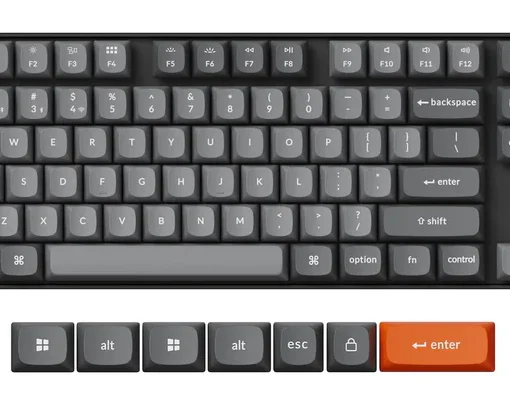
This is another macOS issue. For some reason, Apple decided to do things differently with the keyboard. Where PCs have Alt and Ctrl, plus a Windows key, Macs have command, option, control, and fn. The latter is not just for enabling either the function keys or their secondary function, but also does things with other keys, especially the arrow keys. There are no page up/down/home/end or delete keys, and most of what is done with Ctrl under Windows and Linux is done with Command under macOS – but not everything (Command-Tab comes to mind). Then there are also really strange quirks like Command-X not working in Finder. Some people go as far as switching the Control and Command keys (which can be done in the system settings). If you’re new to macOS, I suggest at least watching a few videos about the peculiarities and looking at Apple’s article on the subject.
Conclusion
The Macbook Neo is clearly aimed at the education and casual user. Apple made some smart choices in what they didn’t use (backlit keyboard, haptic trackpad, 12MP webcam, M-series CPU) and what they did (high-resolution screen, aluminum chassis). While it has been shown that it can do video editing, it’s not the device that I would recommend for that. But if you’re looking for something small and lightweight for web browsing, email, a bit of office work (I would consider the screen too small to use all day) and light coding, that has all-day battery life and is easily carried or used on your lap on the couch, go for it – if you either are a Mac user already or are ready to deal with macOS being different from both Windows and Linux.
Also, unless you don’t expect to ever use larger files, get the 512GB model.